添加更多图标
额外的图标可通过三种方式添加:作为图标字体、作为 SVG sprite 或以独立的 SVG 文件添加。
图标字体
图标字体是一种以字体形式提供的图标集合。图标作为该字体中的字符进行渲染。
| 添加自定义图标字体后,可以使用它来覆盖默认的应用程序图标。详细信息请参考 覆盖默认图标。 |
如需添加图标字体,需要提供以下信息:
-
一个字体文件 - 通常是
.woff或.woff2,或者较旧的格式如.ttf或.eot。 -
一个
@font-face声明 - 通常主题主样式表(styles.css)中导入的自定义样式表里。 -
可选,一个包含图标 CSS 类的样式表 - 通常与
@font-face声明一起添加,并同样导入到styles.css中。
示例:添加 Material 图标
这个示例演示如何在 应用程序主题 中添加 Material 图标。
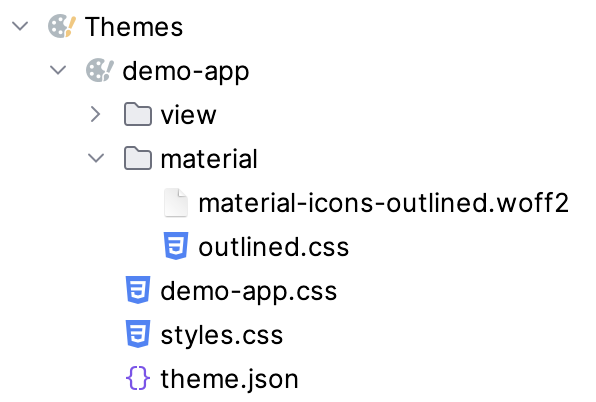
在主题的文件夹下创建一个目录,包含:
-
material-icons-outlined.woff2 -
outlined.css– 包含@font-face声明以及图标的 CSS 类:outlined.css@font-face { font-family: "Material Icons Outlined"; font-style: normal; font-weight: 400; font-display: block; src: url("./material-icons-outlined.woff2") format("woff2"); } .material-icons-outlined { font-family: "Material Icons Outlined"; font-weight: normal; font-style: normal; font-size: 24px; line-height: 1; letter-spacing: normal; text-transform: none; display: inline-block; white-space: nowrap; word-wrap: normal; direction: ltr; -webkit-font-smoothing: antialiased; -moz-osx-font-smoothing: grayscale; text-rendering: optimizeLegibility; font-feature-settings: "liga"; }
在主题的主样式表中导入自定义的样式表:
@import url('material/outlined.css');创建图标时,使用 fontIcon 组件,提供字体家族名称(需匹配 @font-face 中的声明),以及字符编码或连子:
<fontIcon fontFamily="Material Icons Outlined" charCode="e8b6"/>
<fontIcon fontFamily="Material Icons Outlined" ligature="search"/>
fontIcon 组件可以在 prefix、suffix 或 icon 元素内部使用。
|
SVG Sprite
SVG Sprite 是一个包含多个 SVG 图像的集合,作为单个文件加载到应用程序中。可以手动创建精灵,也有很多第三方工具可以创建。
如需添加 SVG Sprite 图标集:
-
在
/frontend/icons/目录中为图标集创建一个 JavaScript 文件。以下代码定义了一个包含三个图标的 sprite:my-icons.jsimport '@vaadin/icon/vaadin-iconset.js'; const template = document.createElement('template'); template.innerHTML = `<vaadin-iconset name="my-icons" size="24"> <svg><defs> <g id="star"><path d="M12 .587l3.668 7.568 8.332 1.207-6 5.848 1.416 8.263L12 18.896l-7.416 3.895L6 14.162l-6-5.848 8.332-1.207z" fill="#FFD700"/></g> <g id="heart"><path d="M12 21.35l-1.45-1.32C5.4 15.36 2 12.28 2 8.5 2 5.42 4.42 3 7.5 3c1.74 0 3.41.81 4.5 2.09C13.09 3.81 14.76 3 16.5 3 19.58 3 22 5.42 22 8.5c0 3.78-3.4 6.86-8.55 11.54L12 21.35z" fill="#FF69B4"/></g> <g id="circle"><circle cx="12" cy="12" r="10" fill="#1E90FF"/></g> </defs></svg> </vaadin-iconset>`; document.head.appendChild(template.content); -
创建一个 Java 枚举,实现
IconFactory,并添加@JsModule注解,引用那个 JavaScript 文件:MyIcons.javapackage com.company.onboarding.icons; import com.vaadin.flow.component.dependency.JsModule; import com.vaadin.flow.component.icon.Icon; import com.vaadin.flow.component.icon.IconFactory; import java.util.Locale; @JsModule("./icons/my-icons.js") public enum MyIcons implements IconFactory { STAR, HEART, CIRCLE; public Icon create() { return new Icon("my-icons", name().toLowerCase(Locale.ENGLISH).replace('_', '-')); } }
图标集注册之后,就可以像使用默认图标一样使用了:
<icon icon="my-icons:star"/>
<icon icon="my-icons:heart"/>
<icon icon="my-icons:circle"/>
Java 代码中,可以通过下面的方式使用:
spriteIconButton.setIcon(MyIcons.STAR.create());单独的 SVG 图片
SVG 文件可以添加至静态资源目录。默认情况下,Spring Boot 的静态资源分布在 classpath 的这些位置:/static、/public、/resources 或 /META-INF/resources。图标可以放在一个子目录中,例如 META-INF/resources/icons。
XML 中通过 svgIcon 组件使用 SVG:
<svgIcon resource="/icons/tree.svg"/>如果需要为组件设置图标,使用内部的 icon 元素:
<button text="Click!">
    <icon>
        <svgIcon resource="/icons/tree.svg"/>
    </icon>
</button>
如果组件支持 前缀或后缀,最好将图标放在前缀或后缀中,以达到最佳的显示效果。例如,将图标放在按钮文字的前面:
<button text="Click!">
    <prefix>
        <svgIcon resource="/icons/tree.svg"/>
    </prefix>
</button>
SVG 图标也可以编程式设置:
SvgIcon treeIcon = new SvgIcon();
treeIcon.setSrc(DownloadHandler.forClassResource(
        getClass(),
        "/META-INF/resources/icons/tree.svg",
        "tree.svg"
));
standaloneIconButton.setIcon(treeIcon);