badge 徽标
Jmix 3.1+
badge 用于展示简短的信息,例如某个状态、一个计数或者一个小标签。
XML 元素 |
|
|---|---|
Java 类 |
|
基本用法
<badge id="pendingBadge" text="Pending"/>
<badge id="confirmedBadge" text="Confirmed" themeNames="success"/>
<badge id="warningBadge" text="Warning" themeNames="warning"/>
<badge id="deniedBadge" text="Denied" themeNames="error"/>
徽标与按钮有几分相似,但无法进行互动。
数据感知的 badge
徽标可以显示一个实体的属性值。通过 dataContainer 和 property 属性绑定 数据容器:
<data>
    <instance id="customerDc"
              class="io.jmix.uisamples.entity.Customer"
              fetchPlan="_local"/>
</data>
<layout>
    <hbox alignItems="CENTER">
        <badge id="nameBadge" icon="USER" dataContainer="customerDc" property="name"/>
        <badge id="gradeBadge" themeNames="success" dataContainer="customerDc" property="grade"/>
    </hbox>
</layout>
绑定是只读的。徽标以文本形式显示属性值,并在值发生变化时更新。值会根据数据类型进行格式化。例如,枚举值显示为本地化标题,而 null 值显示一个空徽标。
如果当前用户无权查看该属性,则徽标不显示。
图标
徽标可以在文本前显示图标。使用 icon 属性或内部的 icon 元素设置:
<badge id="pendingBadge" text="Pending" icon="CLOCK"/>
<badge id="confirmedBadge" text="Confirmed" icon="CHECK" themeNames="success"/>
<badge id="warningBadge" text="Warning" icon="WARNING" themeNames="warning"/>
<badge id="deniedBadge" text="Denied" themeNames="error">
    <icon>
        <icon icon="EXCLAMATION_CIRCLE"/>
    </icon>
</badge>
icon-only 样式仅显示图标。最好也同时设置文本标签,虽然在屏幕上不显示,但屏幕阅读器能朗读。
<badge id="confirmedIconBadge" text="Confirmed" icon="CHECK" themeNames="success icon-only"/>
<badge id="deniedIconBadge" text="Denied" icon="CLOSE" themeNames="error icon-only"/>
数字
number 属性在徽标上显示一个数字,例如未读消息的数量。如果徽标既有文本又有数字,则会同时显示。
number-only 样式仅显示数字。与 icon-only 一样,最好也同时设置文本:
<badge id="numberOnlyBadge" text="unread messages" number="5" themeNames="number-only"/>在视图控制器中,使用 setNumber() 方法更改数字,使用 setNumber(null) 移除。
屏幕阅读器只读取徽标的内容。单独的数字可能会让用户感到困惑,因此需设置一个说明计数内容的文本。如果在视图打开时数字发生变化,请将 ariaRole 设置为 status,屏幕阅读器将会朗读新值。
样式版本
使用 themeNames 属性配置样式。可以同时配置多个样式,例如 themeNames="success filled"。在视图控制器中,使用 addThemeVariants() 方法,参数为 BadgeVariant 枚举类型。
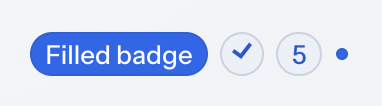
| 样式 | 描述 | 支持的主题 |
|---|---|---|
|
应用语义颜色。 |
Aura, Lumo |
|
应用中性高对比色。 |
Lumo |
|
使用纯色背景而不是淡色背景,表示更多的强调。可以与所有其他样式结合使用。 |
Aura, Lumo |
|
尺寸较小。 |
Aura, Lumo |
|
仅显示图标。参考 图标。 |
Aura, Lumo |
|
仅显示数字。参考 数字. |
Aura, Lumo |
|
将徽标显示为一个小点,隐藏所有内容。 |
Aura, Lumo |
XML 属性
下面是 badge 的特殊属性:
| 名称 | 描述 | 默认值 |
|---|---|---|
设置屏幕阅读器使用的 ARIA 角色。例如, |
— |
|
设置文本前显示的图标。参考 图标。 |
— |
|
设置徽标显示的数字。参考 数字。 |
— |
|
应用 样式版本 中列举的一个或多个样式。 |
— |
下面是 badge 支持的其他通用属性:
id - alignSelf - classNames - colspan - css - dataContainer - height - justifySelf - maxHeight - maxWidth - minHeight - minWidth - property - text - visible - whiteSpace - width
XML 内部元素
一个 badge 可以包含 icon 作为其内部元素。参考 图标。