markdown
基本用法
markdown 组件可以将 Markdown 语法编写的内容渲染成 HTML。支持基本的文本格式、列表、链接以及其他常见的 Markdown 特性。所有内容都会自动进行净化,以防止渲染潜在危险的 HTML。
有关 Markdown 语法的详细信息,请参考 Markdown 指南。
可以使用 content 属性或嵌套的 content 元素为组件提供内容。
-
以下示例演示了如何通过
content属性和 消息包 中的字符串添加 Markdown 内容:<markdown content="msg://markdown.content"/>messages.propertiescom.company.onboarding.view.component.markdown/markdown.content=### Welcome to Our App\n\ This is a **markdown** component demonstrating:\n\ - Basic formatting\n\ - List items\n\ - [Links](https://example.com)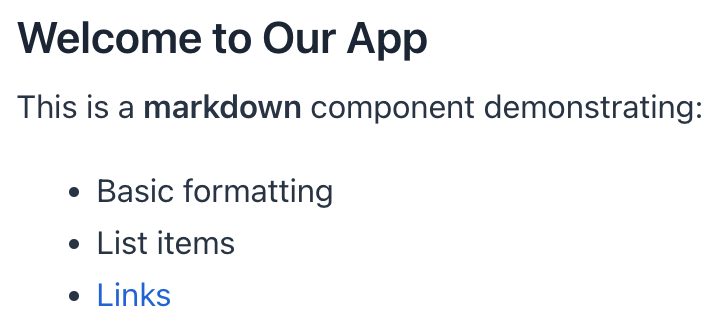
-
使用
content子元素的示例:<markdown> <content> ## Getting Started Follow these steps to begin: 1. Create an account 2. Verify your email 3. Start using the application *Important:* Make sure to read the [documentation](https://docs.example.com). </content> </markdown>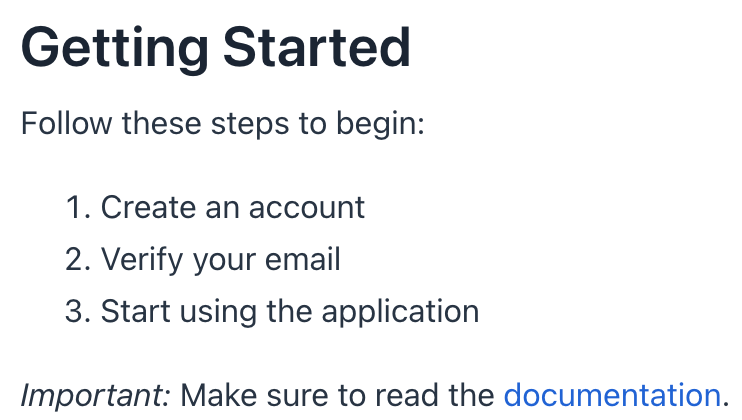
当使用 content子元素时,请避免在每行开头添加空格。Markdown 的语法对缩进有要求,冗余的空格可能会影响对 header、列表、代码段等格式化元素的渲染。
本页是否有帮助?

感谢您的反馈