popover 浮窗
Jmix 3.1+
popover 是一个浮窗,在另一个组件(称为目标)旁边打开。与 tooltip 不同,popover 可以包含任何组件,例如字段、按钮和布局,用户可以与之交互。
XML 元素 |
|
|---|---|
Java 类 |
|
基本用法
在视图布局中声明 popover,并将 target 属性设置为某个组件的 id:
<button id="infoButton" text="About" icon="INFO_CIRCLE_O"/>
<popover id="infoPopover" target="infoButton" width="20em">
    <vbox padding="false">
        <h4 text="Onboarding"/>
        <span text="New employees complete the onboarding steps during their first weeks."/>
        <button id="closeButton" text="Close"/>
    </vbox>
</popover>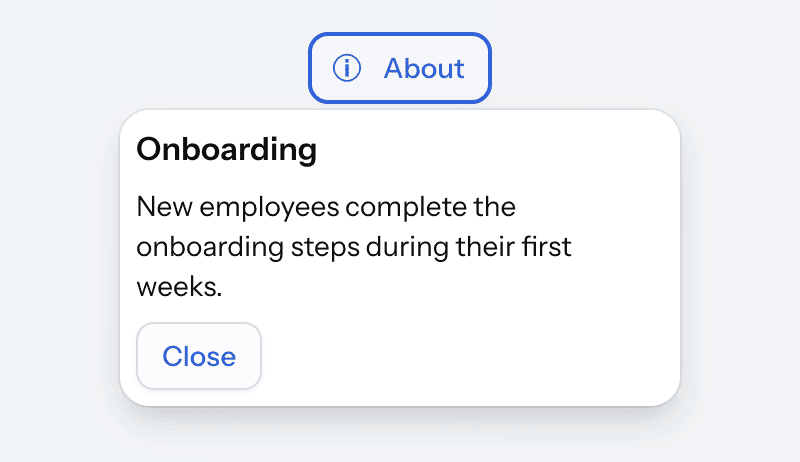
popover 不占用布局空间。其内容仅在浮窗打开时显示。默认情况下,当用户点击目标时浮窗打开。当用户再次点击目标、点击浮窗外部或按下 Esc 时,关闭浮窗。
浮窗及其内容是视图的常规组件。可以将它们注入视图控制器或订阅组件的事件。在上面的示例中,popover 中的按钮使用 close() 方法将其关闭:
@ViewComponent
private Popover infoPopover;

@Subscribe(id = "closeButton", subject = "clickListener")
public void onCloseButtonClick(final ClickEvent<JmixButton> event) {
    infoPopover.close();
}
目标
target 属性指定同一视图或 fragment 中组件的 id。目标可以在 popover 之前或之后声明。如果没有此 id 的组件,视图将无法打开,并抛出 GuiDevelopmentException。
target 属性是可选的。如果目标组件在视图控制器中创建,则可以声明不带 target 的 popover:
<textField id="emailField" label="Email"/>
<popover id="emailHelpPopover" width="16em">
    <span text="Use your corporate address."/>
</popover>
然后使用 setTarget() 方法设置目标:
@ViewComponent
private Popover emailHelpPopover;
@ViewComponent
private TypedTextField<String> emailField;
@Autowired
private UiComponents uiComponents;

@Subscribe
public void onInit(final InitEvent event) {
    JmixButton helpButton = uiComponents.create(JmixButton.class);
    helpButton.setIcon(VaadinIcon.QUESTION_CIRCLE.create());
    helpButton.addThemeVariants(ButtonVariant.TERTIARY);
    emailField.setSuffixComponent(helpButton);

    emailHelpPopover.setTarget(helpButton);
}
没有目标的 popover 不会因用户操作而打开。如果使用 open() 方法打开,会显示在屏幕中央。
打开和关闭
openOnClick、openOnHover 和 openOnFocus 属性定义用户的哪些操作会打开 popover。默认仅启用 openOnClick。也可以启用多种方式。
悬停时打开
下面的 popover 在用户将指针移到头像上时打开:
<avatar id="userAvatar" name="Alice Brown"/>
<popover target="userAvatar"
         openOnClick="false"
         openOnHover="true"
         hoverDelay="300"
         hideDelay="300">
    <vbox padding="false" spacing="false">
        <h5 text="Alice Brown"/>
        <span text="HR manager"/>
        <anchor href="mailto:alice@company.com" text="alice@company.com"/>
    </vbox>
</popover>
当指针离开目标和 popover 时,浮窗才会关闭,因此用户可以将指针移到浮窗上并进行操作。
hoverDelay 属性设置浮窗打开前的延迟,hideDelay 设置关闭前的延迟。两个延迟均以毫秒为单位,默认均为 500。
获得焦点时打开
下面的 popover 在密码字段获得焦点时打开:
<passwordField id="passwordField" label="Password"/>
<popover target="passwordField"
         openOnClick="false"
         openOnFocus="true"
         position="END">
    <span text="Use at least 8 characters, including a letter and a digit."/>
</popover>
当焦点离开目标和 popover 时,浮窗才会关闭。focusDelay 属性设置浮窗打开前的延迟,默认 500 毫秒。
以编程方式打开
如果三个属性均为 false,对用户在目标组件上的任何操作都不会打开浮窗。但可以在视图控制器中打开:
<hbox alignItems="BASELINE">
    <textField id="promoCodeField" label="Promo code"/>
    <button id="promoCodeHelpButton" text="Where do I find it?" themeNames="tertiary"/>
</hbox>
<popover id="promoCodePopover"
         target="promoCodeField"
         openOnClick="false"
         width="16em">
    <span text="The promo code is printed on the back of your loyalty card."/>
</popover>
@ViewComponent
private Popover promoCodePopover;
@Subscribe(id = "promoCodeHelpButton", subject = "clickListener")
public void onPromoCodeHelpButtonClick(final ClickEvent<JmixButton> event) {
promoCodePopover.open();
}open() 和 close() 方法打开和关闭 popover,isOpened() 返回当前状态。
关闭
无论 popover 如何打开,点击其外部和 Esc 键都会将其关闭。将 closeOnOutsideClick 和 closeOnEsc 属性设置为 false 可禁用此行为。
定位
position 属性定义浮窗相对于目标的打开位置:在其上方(TOP_START、TOP、TOP_END)、下方(BOTTOM_START、BOTTOM、BOTTOM_END)、左方(START_TOP、START、START_BOTTOM)或右方(END_TOP、END、END_BOTTOM)。默认为 BOTTOM。如果该侧空间不足,浮窗会在对侧打开。
下面的 popover 在按钮之后打开,并显示一个指向它的箭头:
<button id="statusButton" text="Status"/>
<popover target="statusButton" position="END" themeNames="arrow">
    <span text="3 of 5 steps completed"/>
</popover>
模态浮窗
模态浮窗(设置 modal="true")显示为目标旁边的小对话框。当其打开时,用户无法与 UI 的其余部分交互,焦点保持在浮窗中。设置 backdropVisible="true" 使背后的 UI 变暗。
默认情况下,点击模态浮窗外部会将其关闭。下面的浮窗设置 closeOnOutsideClick="false",因此会一直打开,直到用户点击其中的按钮关闭:
<h3 id="reportTitle" text="Quarterly report"/>
<button id="renameButton" text="Rename"/>
<popover id="renamePopover"
         target="renameButton"
         modal="true"
         backdropVisible="true"
         closeOnOutsideClick="false"
         width="18em">
    <vbox padding="false">
        <textField id="titleField" label="Title" width="100%"/>
        <hbox>
            <button id="saveButton" text="Save" themeNames="primary"/>
            <button id="cancelButton" text="Cancel"/>
        </hbox>
    </vbox>
</popover>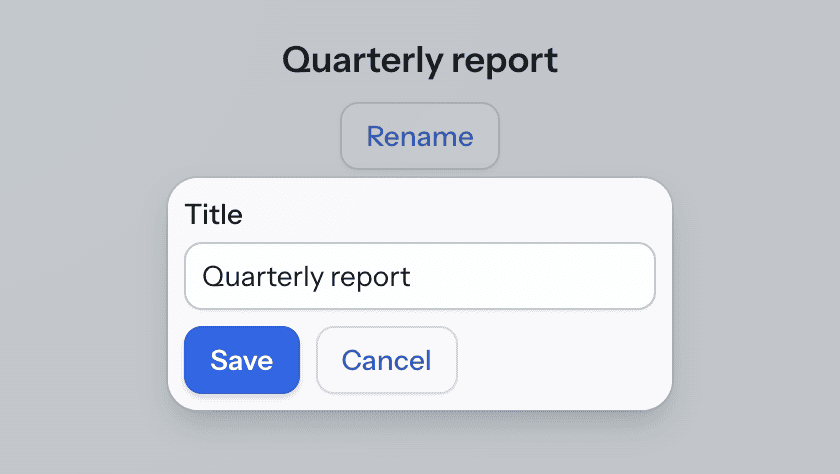
控制器在浮窗打开时填充字段,并在用户点击 Save 时保存值:
@ViewComponent
private Popover renamePopover;
@ViewComponent
private H3 reportTitle;
@ViewComponent
private TypedTextField<String> titleField;

@Subscribe("renamePopover")
public void onRenamePopoverOpenedChange(final Popover.OpenedChangeEvent event) {
    if (event.isOpened()) {
        titleField.setValue(reportTitle.getText());
    }
}

@Subscribe(id = "saveButton", subject = "clickListener")
public void onSaveButtonClick(final ClickEvent<JmixButton> event) {
    reportTitle.setText(titleField.getValue());
    renamePopover.close();
}

@Subscribe(id = "cancelButton", subject = "clickListener")
public void onCancelButtonClick(final ClickEvent<JmixButton> event) {
    renamePopover.close();
}
尺寸和样式
width 和 height 属性设置浮窗内容的大小。最好使用绝对单位,例如 px 或 em。相对单位(如 %)会产生不可预知的结果。没有配置这些属性时,浮窗遵循其内容的大小。不支持 minWidth、maxWidth、minHeight 和 maxHeight 属性。
由于浮窗显示在视图布局之外,因此不支持 css 属性。在 Java 中,getStyle() 会抛出 UnsupportedOperationException。如需设置浮窗的样式,请使用 classNames 属性添加类名,在应用程序主题中定义样式。
主题样式
使用 themeNames 属性设置组件主题。
| 样式 | 描述 | 支持的主题 |
|---|---|---|
|
显示指向目标的箭头。 |
Aura、Lumo |
|
移除内容周围的内边距。 |
Aura、Lumo |
XML 属性
下面是 popover 的特殊属性:
| 名称 | 描述 | 默认值 |
|---|---|---|
设置 popover 的 ARIA 角色,屏幕阅读器使用该角色。 |
|
|
当为 |
|
|
当为 |
|
|
当为 |
|
|
当为 |
|
|
设置当目标获得焦点时 popover 打开前的延迟,单位为毫秒。请参见 获得焦点时打开。 |
|
|
设置 popover 内容的高度。请参见 尺寸和样式。 |
— |
|
设置当指针离开目标和 popover 时浮窗关闭前的延迟,单位为毫秒。当目标失去焦点时,popover 立即关闭。请参见 悬停时打开。 |
|
|
设置当指针移到目标上时 popover 打开前的延迟,单位为毫秒。请参见 悬停时打开。 |
|
|
当为 |
|
|
当为 |
|
|
当为 |
|
|
当为 |
|
|
设置 popover 相对于目标的位置。请参见 定位。 |
|
|
当为 |
|
|
设置目标组件的 id。请参见 目标。 |
— |
|
使用 主题样式 中列出的一个或多个样式。 |
— |
|
设置 popover 内容的宽度。请参见 尺寸和样式。 |
— |
下面是 popover 支持的其他通用属性:
id - ariaLabel - ariaLabelledBy - classNames - enabled - visible
事件和处理器
| 名称 | 描述 |
|---|---|
当 popover 附加到 UI 时触发。 |
|
当 popover 从 UI 分离时触发。 |
|
当 popover 打开或关闭时触发。使用事件的 |